Flexbox Cheat Sheet

Intro

A flexbox is a one-dimensional layout model that helps you lay out items in a row or column with fine-tuned control over spacing, alignment, and item sizing.

Common Uses:

  • Navigation Bars
  • Button Groups
  • Toolbars
  • Card Rows
  • Media Objects (Image + Text)
  • Centering Things
  • Small UI Components Inside a Larger Layout

Flexbox Excels At:

  • Content Driven Sizing
  • Distributing Leftover Space
  • Aligning Items Relative to Each Other
  • Handling Unknown or Dynamic Item Sizes

Flexbox Axes

Main Axis & Cross Axis

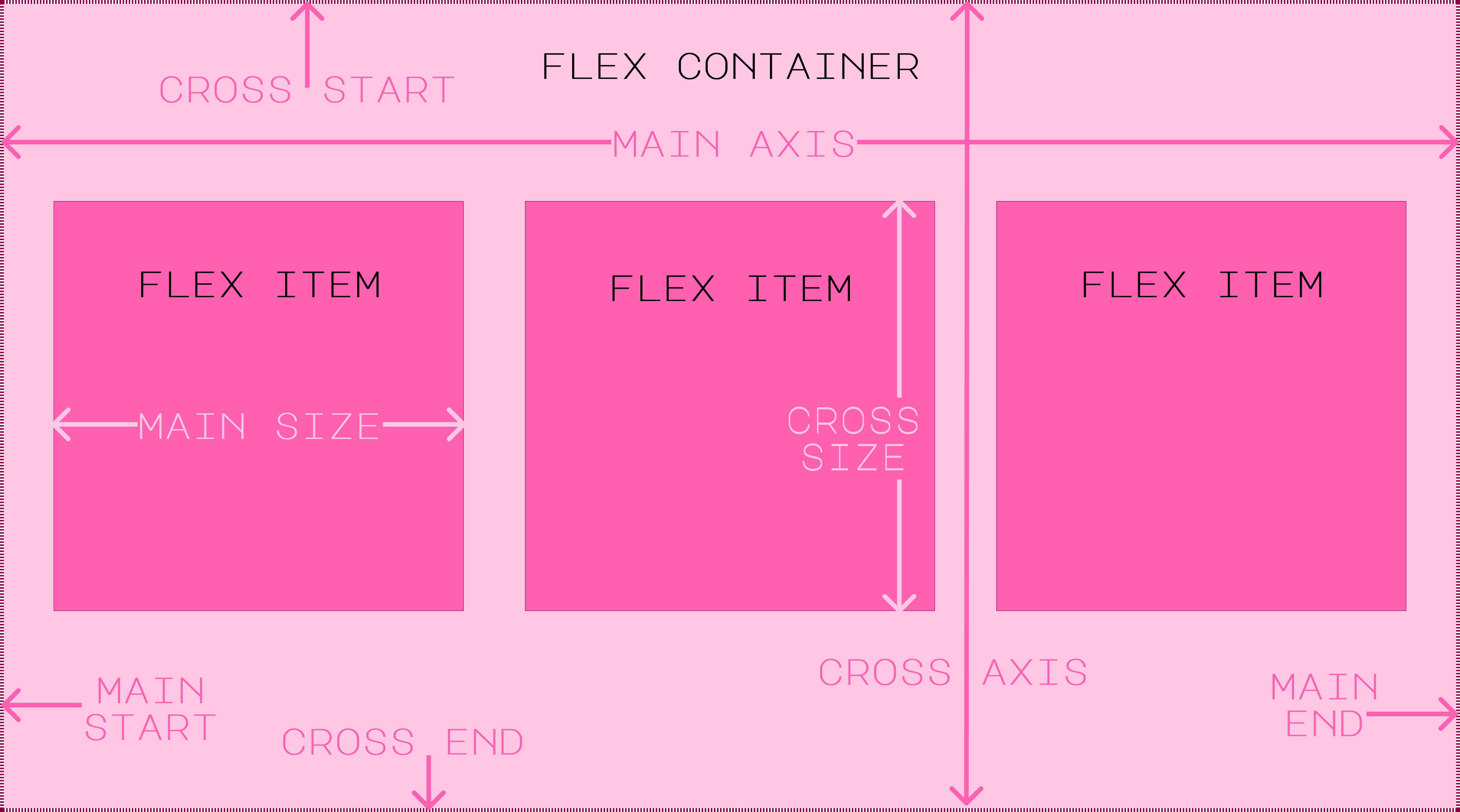
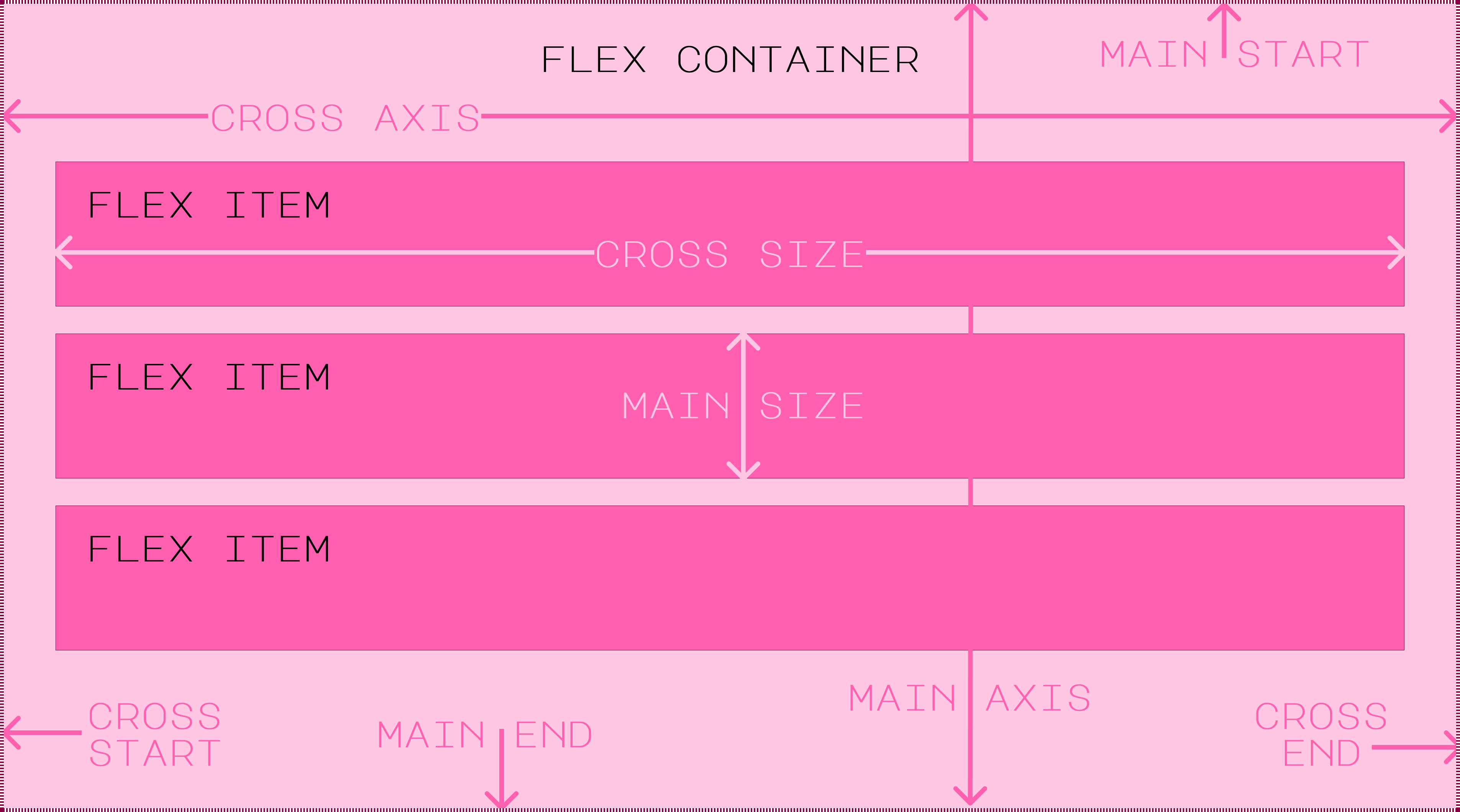
The main axis is the axis along which flex items are laid out. It is defined by the flex-direction property.

The cross axis is perpendicular to the main axis. It determines the direction in which flex lines will be added when wrapping is set via the flex-flow property.

Main & Cross Terms

Flexboxes work on an axis grid system. It is a parent-child relationship. The parent is the flex container and the children are the flex items. The following terms relate to the dimensions, placement, and sizing for both the main axis and the cross axis:


Terms As Applied to Flex-Direction: Row


Flexbox Main Axis for Flex Row Direction

Terms As Applied to Flex-Direction: Column


Flexbox Main Axis for Flex Column Direction

Terms for each Flex-Direction

The table below shows how each term applies to each flex-direction when flex-wrap: nowrap or flex-wrap: wrap is set.

  Row Row-Reverse Column Column-Reverse
Main Axis Left to Right Right to Left Top to Bottom Bottom to Top
Main Start Left Right Top Bottom
Main End Right Left Bottom Top
Main Dimension Horizontal Horizontal Vertical Vertical
Main Size Width Width Height Height
Cross Axis* Top to Bottom Top to Bottom Left to Right Left to Right
Cross Start* Top Top Left Left
Cross End* Bottom Bottom Right Right
Cross Dimension Vertical Vertical Horizontal Horizontal
Cross Size Height Height Width Width
* The cross terms change when flex-wrap: wrap-reverse is set.

The table below shows how each term applies to each flex-direction when flex-wrap: wrap-reverse is set.

  Row Row-Reverse Column Column-Reverse
Cross Axis* Bottom to Top Bottom to Top Right to Left Right to Left
Cross Start* Bottom Bottom Right Right
Cross End* Top Top Left Left
* The cross terms change when flex-wrap: nowrap or flex-wrap: wrap is set.


Display

When a selector is given a property of display: flex or display: inline-flex, the selector becomes a flex container. All elements nested within the flex container become flex items. The flex container is the parent of the flex items and largely controls how the flex items behave within the container.

Display: Flex

A
B
C
D
E

Display: Flex causes flex containers to act as a block element. The container will maintain the set or default dimensions.

Display: Inline-Flex

A
B
C
D
E

Display: Inline-Flex causes flex containers to act as an inline-block element. If no dimensions are set for the container, it will only stretch to the size of its children.


Flex Container Properties

The following properties are set on the flex container. They are used to control the behavior of the flex items within the container.

Flex-Direction

The flex-direction property sets the direction in which the main axis is laid out. If it's associated with a row, the main axis will be horizontal. If it's associated with a column, the main axis will be vertical.

Flex-Direction: Row

A
B
C

Flex-Direction: Row is the default setting. It places flex items in an inline horizontal row on the main axis.

Flex-Direction: Row-Reverse

A
B
C

Flex-Direction: Row-Reverse places flex items in reverse order in an inline horizontal row on the main axis.

Flex-Direction: Column

A
B
C

Flex-Direction: Column places flex items vertically along the main axis.

Flex-Direction: Column-Reverse

A
B
C

Flex-Direction: Column-Reverse places flex items in reverse order vertically along the main axis.


Flex-Wrap

The flex-wrap property allows flex items to wrap onto multiple flex lines (rows or columns of flex containers) instead of having flex items overflow the container or shrink too small and remain on one line.

Flex-Wrap: NoWrap

A
B
C
D
E

Flex-Wrap: NoWrap is the default setting. If the size of the flex items is greater than the size of the container, they will either overflow the container or shrink to fit depending on the property settings for the items.

Flex-Wrap: Wrap

A
B
C
D
E

Flex-Wrap: Wrap allows flex items to wrap onto multiple lines, preventing overflow and maintaining item size.

Flex-Wrap: Wrap-Reverse

A
B
C
D
E

Flex-Wrap: Wrap-Reverse allows flex items to wrap onto multiple lines in reverse order, preventing overflow and maintaining item size.


Flex-Flow

The flex-flow property is shorthand for both flex-direction and flex-wrap. The values need to be added in that order. The following example is just one of many combinations.

Flex-Flow: Column Wrap

A
B
C
D
E

The above example shows the flex-flow: column wrap combination.

Flex-Flow Values

The table below shows all value combinations for flex-flow.

Remember that flex-direction: row and flex-wrap: nowrap are the default settings. If you want to use one or both of those, there is no need for this shorthand property.

flex-flow:
row-reverse wrap
reverses the order of items and wraps horizontal overflow to a new line.
1
2
3
4
5
6
flex-flow:
row-reverse wrap-reverse
reverses the order of items and reverses the wrap order when moving horizontal overflow to a new line.
1
2
3
4
5
6
flex-flow:
column wrap
places items vertically and wraps all overflowing items in a new column.
1
2
3
4
5
6
flex-flow:
column wrap-reverse
Places items vertically and reverses the wrap order when placing overflowing items in a new column.
1
2
3
4
5
6
flex-flow:
column-reverse wrap
Places items vertically in reverse order and wraps all overflowing items in a new column.
1
2
3
4
5
6
flex-flow:
column-reverse wrap-reverse
Places items vertically in reverse orderand reverses the wrap order when placing overflowing items in a new column.
1
2
3
4
5
6


Justify-Content

The justify-content property aligns flex items along the main axis of the flex container. It can also be used to distribute space between and around flex items along the main axis of the flex container. Great for nav links, button groups, or toolbars.

Justify-Content: Flex-Start

A
B
C

Justify-Content: Flex-Start aligns flex items to the start of the main axis. This is the default setting.

When the flex-direction is related to the row, this will be horizontal. When the flex-direction is related to the column, it will be vertical.

Justify-Content: Flex-End

A
B
C

Justify-Content: Flex-End aligns flex items to the end of the main axis.

When the flex-direction is related to the row, this will be horizontal. When the flex-direction is related to the column, it will be vertical.

Justify-Content: Center

A
B
C

Justify-Content: Center aligns flex items to the center of the main axis.

When the flex-direction is related to the row, this will be horizontal. When the flex-direction is related to the column, it will be vertical.

Justify-Content: Space-Between

A
B
C

Justify-Content: Space-Between distributes space between flex items along the main axis. It does not add space between the main start and the first flex item, or between the main end and the last flex item.

When the flex-direction is related to the row, this will be horizontal. When the flex-direction is related to the column, it will be vertical.

Justify-Content: Space-Around

A
B
C

Justify-Content: Space-Around distributes space around flex items along the main axis. It adds space before the first flex item and after the last flex item, and equal space between each flex item. The space added before the first flex item and after the last flex item is typically half the size of the space between each flex item.

When the flex-direction is related to the row, this will be horizontal. When the flex-direction is related to the column, it will be vertical.

Justify-Content: Space-Evenly

A
B
C

Justify-Content: Space-Evenly distributes space evenly between flex items along the main axis. It adds space before the first flex item and after the last flex item, and equal space between each flex item. The space added before the first flex item and after the last flex item is equal to the space between each flex item.

When the flex-direction is related to the row, this will be horizontal. When the flex-direction is related to the column, it will be vertical.

Justify-Content: Inherit

Justify-Content: Inherit inherits the justify-content value from the parent element.

Justify-Content: Initial

Justify-Content: Initial sets the justify-content value to the default value of the flex items properties.


Align-Items

The align-items property aligns flex items along the cross axis of the flex container. It can also be used to distribute space between and around flex items along the cross axis of the flex container. Useful for centering text/icons within buttons or list items.

Align-Items: Stretch

A
B
C

Align-Items: Stretch stretches flex items to fill the cross axis of the flex container. This is the default setting. This will not work if flex items have set measurements. If measurements are set for items, all items will stretch to the size of the largest flex item.

When the flex-direction is related to the row, this will be vertical. When the flex-direction is related to the column, it will be horizontal.

Align-Items: Flex-Start

A
B
C

Align-Items: Flex-Start aligns flex items to the start of the cross axis.

When the flex-direction is related to the row, this will be vertical. When the flex-direction is related to the column, it will be horizontal.

Align-Items: Flex-End

A
B
C

Align-Items: Flex-End aligns flex items to the end of the cross axis.

When the flex-direction is related to the row, this will be vertical. When the flex-direction is related to the column, it will be horizontal.

Align-Items: Center

A
B
C

Align-Items: Center aligns flex items to the center of the cross axis.

When the flex-direction is related to the row, this will be vertical. When the flex-direction is related to the column, it will be horizontal.

Align-Items: Baseline

A
B
B
C
C
C

Align-Items: Baseline aligns flex items based on the baseline of the text. The baseline is the bottom line of the first line of text.

This alignment only works along a single flex line. The alignment is only noticable if the flex-direction is related to the row. If the flex-direction is related to the column, the alignment will work the same way as align-items: flex-start.

Align-Items: Inherit

Align-Items: Inherit inherits the align-items value from the parent element.


Align-Items: Initial

Align-Items: Initial sets the align-items value to the default valueof the flex items properties.


Align-Content

The align-content property aligns flex lines within the flex container along the cross axis of the flex container. This property only works when flex-flow: wrap or flex-flow: wrap-reverse is set and there are 2 or more flex lines. Good for controlling spacing between rows in a grid-like flex layout.

Align-Content: Stretch

A
BB
CCC
DDDD
EEEEE
FFFFFF
GGGGGGG
HHHHHHHH
IIIIIIIII

Align-Content: Stretch stretches flex lines to fill the cross axis of the flex container. This is the default setting. This will not work if flex items have set measurements. If measurements are set for items, all flex lines will stretch to the size of the largest flex item.

When the flex-direction is related to the row, this will be vertical. When the flex-direction is related to the column, it will be horizontal.

Align-Content: Flex-Start

A
BB
CCC
DDDD
EEEEE
FFFFFF
GGGGGGG
HHHHHHHH
IIIIIIIII

Align-Content: Flex-Start aligns flex lines to the start of the cross axis.

When the flex-direction is related to the row, this will be vertical. When the flex-direction is related to the column, it will be horizontal.

Align-Content: Flex-End

A
BB
CCC
DDDD
EEEEE
FFFFFF
GGGGGGG
HHHHHHHH
IIIIIIIII

Align-Content: Flex-End aligns flex lines to the end of the cross axis.

When the flex-direction is related to the row, this will be vertical. When the flex-direction is related to the column, it will be horizontal.

Align-Content: Center

A
BB
CCC
DDDD
EEEEE
FFFFFF
GGGGGGG
HHHHHHHH
IIIIIIIII

Align-Content: Center aligns flex lines to the center of the cross axis.

When the flex-direction is related to the row, this will be vertical. When the flex-direction is related to the column, it will be horizontal.

Align-Content: Space-Between

A
BB
CCC
DDDD
EEEEE
FFFFFF
GGGGGGG
HHHHHHHH
IIIIIIIII

Align-Content: Space-Between distributes space between flex lines along the cross axis. It does not add space between the cross start and the first flex line, or between the cross end and the last flex line.

When the flex-direction is related to the row, this will be vertical. When the flex-direction is related to the column, it will be horizontal.

Align-Content: Space-Around

A
BB
CCC
DDDD
EEEEE
FFFFFF
GGGGGGG
HHHHHHHH
IIIIIIIII

Align-Content: Space-Around distributes space around flex lines along the cross axis. It adds space before the first flex line and after the last flex line, and equal space between each flex line. The space added before the first flex line and after the last flex line is typically half the size of the space between each flex line.

When the flex-direction is related to the row, this will be vertical. When the flex-direction is related to the column, it will be horizontal.

Align-Content: Space-Evenly

A
BB
CCC
DDDD
EEEEE
FFFFFF
GGGGGGG
HHHHHHHH
IIIIIIIII

Align-Content: Space-Evenly distributes space evenly between flex lines along the cross axis. It adds space before the first flex line and after the last flex line, and equal space between each flex line. The space added before the first flex line and after the last flex line is equal to the space between each flex line.

When the flex-direction is related to the row, this will be vertical. When the flex-direction is related to the column, it will be horizontal.

Align-Content: Inherit

Align-Content: Inherit inherits the align-content value from the parent element.


Align-Content: Initial

Align-Content: Initial sets the align-content value to the default value of the flex items properties.


The Gap Properties

The gap properties add consistent spacing between flex items. It never adds space before the first flex item or after the last flex item. It simply creates equal space between items within the container.

Gap Shorthand

The gap property is a shorthand property for the column-gap and row-gap properties. It can have one value for both the column and row gap, or two values for the column and row gap. The values are numerical measurements.

Gap: One Value

When a single value is used for the gap property, it will be applied to both the column-gap and row-gap. This means it will add an equal space both vertically and horizontally.

A
B
C
D
E
F
G

The above example shows a setting of gap: 20px

Gap: Two Values

When two values are used for the gap property, the first value will be applied to the column-gap and the second value will be applied to the row-gap.

A
B
C
D
E
F
G

The above example shows a setting of gap: 10px 30px

Column-Gap and Row-Gap

The column-gap and row-gap properties add consistent spacing between flex items. It never adds space before the first flex item or after the last flex item. It simply creates equal space between items within the container.

Column-Gap

The column-gap property adds consistent horizontal spacing between flex items. This is the case no matter the value that is set for flex-direction.

A
B
C
D
E
F
G

Row-Gap

The row-gap property adds consistent vertical spacing between flex items. It is always apparent when the flex-direction is related to the column. When the flex-direction is related to the row, it is not apparent unless the items wrap to two or more flex lines.

A
B
C
D
E
F
G


Flex Item Properties

The following properties are set on individual flex items. They are used to control the behavior of the flex items within the container.

The Flex Properties

The flex properties are used to control the sizing behavior of flex items. The flex-grow property controls the flex items ability to grow to fill the available space of the flex container. The flex-shrink property controls the flex items ability to shrink to fit the dimensions of the flex container if the items are overflowing. The flex-basis property controls the initial size of the flex item before any growth or shrinkage occurs. These can all be combined using the shorthand flex property. When the flex-direction is related to the row, the width of the items is affected. When the flex-direction is related to the column, the height of the items is affected. These properties will not override any max-width, min-width, max-height, or min-height properties if they have been set for the item. However, they will override any standard width or height properties if they have been set.

Flex-Grow

The flex-grow property controls the flex items ability to grow to fill the available space of the flex container. The default value is 0 which means the flex items do not grow by default. If the value is set to 1, the flex item will grow to fill the available space of the flex container. If the value is set to 2, the flex item will grow to fill twice the available space, etc. The number must always be positive. Decimals are also accepted. The sizing is proportional and the settings for all other flex items in the container are considered when the flex item with this setting grows.

Flex-Grow Formula

The size that the flex items will grow to fill the container can be determined by using all of the following calculations:

  • Base Size = Sum of All Item Sizes
  • Available Space = Container Size - Base Size
  • Grow Factors = Sum of All Flex-Grow Values
    (each item's flex-grow defaults to 0 if not specified)
  • Grow Unit = Available Space/Grow Factors
  • Additional Size = Item Flex-Grow Value x Grow Unit
  • Final Size = Base Size + Additional Size

Flex-Grow Examples


Written Example


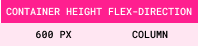
The height of the flex container is 600px.
It is set to flex-direction: column.
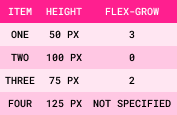
It contains the following four flex items:
Step 1: Base Size = Sum of All Item Sizes
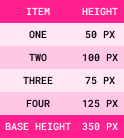
Step 2: Available Space = Container Size - Base Size

Step 3: Grow Factors = Sum of All Flex-Grow Values
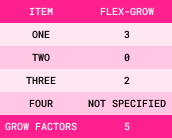
When the flex-grow value is not specified for an item, it defaults to 0.

Step 4: Grow Unit = Available Space/Grow Factors

Step 5: Additional Size = Item Flex-Grow Value x Grow Unit
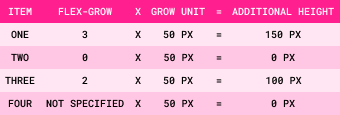
Step 6: Final Size = Item Size + Additional Size
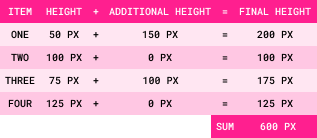
Visual Examples


Here is a visual representation of the written example:

The container and items without flex-grow values:

Item One
original height: 50px
Item Two
original height: 100px
Item Three
original height: 75px
Item Four
original height: 125px

The container and items with flex-grow values:

Item One
flex-grow: 3
original height: 50px
final height: 200px
Item Two
flex-grow: 0
original height: 100px
final height: 100px
Item Three
flex-grow: 2
original height: 75px
final height: 175px
Item Four
flex-grow: 0
original height: 125px
final height: 125px

The following information will be valid for all examples:

  • The flex container has a static width of 320px.
  • All 3 flex items have a min width of 80px with no padding or margins, which means the minimum amount of space they will take up is 240px (80px x 3 = 240px).
  • This means the available space for the flex items to grow into is 80px (320px - 240px = 80px).

Example 1: The flex-grow value is set to 1 for all flex items.

A
flex-grow: 1
width: 106.67px
B
flex-grow: 1
width: 106.67px
C
flex-grow: 1
width: 106.67px

Since the value is 1 for all items, they will all grow to fill the available space equally. This means each item will grow approximately 26.67px (80px / 3 = 26.67px). This gives each item a width of 106.67px (80px + 26.67px = 106.67px).

Example 2: The flex-grow value is set to 0 (default value) for items A and B, and 1 for item C.

A
flex-grow: 0
width: 80px
B
flex-grow: 0
width: 80px
C
flex-grow: 1
width: 160px

Since the value is 0 for items A and B, they will not grow. Item C will grow to fill all of the available space. This means it will grow approximately 80px. This makes the total width for item C 160px (80px + 80px = 160px).

Example 3: The flex-grow value is set to 0 (default value) for item A, 1 for item B, and 2 for item C.

A
flex-grow: 0
width: 80px
B
flex-grow: 1
width: 106.67px
C
flex-grow: 2
width: 133.33px

Since the value is 0 for item A, it will not grow. Item B has a value of 1, while item C has a value of 2. This means that item b will take up 1/3 of the available space, while item C will take up 2/3 of the available space. When the available space is divided by 3, the result is 26.67px (80px / 3 = 26.67px). This means item B will grow to 106.67px (80px + 26.67px = 106.67px) and item C will grow to 133.33px (80px + 26.67px + 26.67px = 133.33px).


Flex-Shrink

The flex-shrink property controls the flex items ability to shrink to fit the flex container if the items are overflowing. The default value is 1 which means the flex items will shrink to fit the flex container if they are overflowing. If the value is set to 0, the flex item will not shrink. If the value is set to 2, the flex item will shrink twice the amount to fit the container, etc. The number must always be positive. Decimals are also accepted. The sizing is proportional and the settings for all other flex items in the container are considered when the flex item with this setting shrinks. Unlike the flex-grow property, the flex-shrink property requires a shrink percentage to be calculated when items are different sizes.

Flex-Shrink Formula

The size that the flex items will shrink to fit the container can be calculated in a similar way to the flex-grow formula when all flex items are the same size. However, when the flex items are different sizes, the formula is slightly more complex as shown in the following calculations:

  • Base Size = Sum of All Item Sizes
  • Overflow Amount = Base Size - Container Size
  • Item Shrink Contribution = Item Size x Item Flex-Shrink Value
    (each item's flex-shrink defaults to 1 if not specified)
  • Total Shrink Contribution = Sum of All Item Shrink Contributions
  • Shrink Factor = Overflow Amount/Total Shrink Contribution
  • Shrink Amount = Item Shrink Contribution x Shrink Factor
  • Final Size = Item Size - Shrink Amount

Flex-Shrink Examples


Written Example


The height of the flex container is 600px.
It is set to flex-direction: column.

It contains the following four flex items:
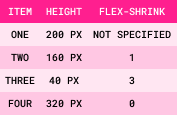
Step 1: Base Size = Sum of All Item Sizes
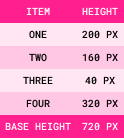
Step 2: Overflow Amount = Base Size - Container Size

Step 3: Item Shrink Contribution = Item Size x Item Flex-Shrink Value
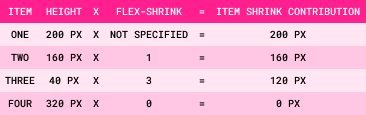
When the flex-shrink value is not specified for an item, it defaults to 1.

Step 4: Total Shrink Contribution = Sum of All Item Shrink Contributions
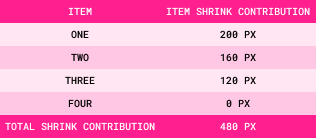
Step 5: Shrink Factor = Overflow Amount/Total Shrink Contribution

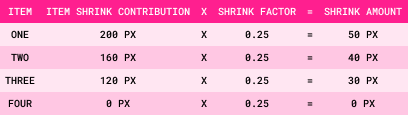
Step 6: Shrink Amount = Item Shrink Contribution x Shrink Factor
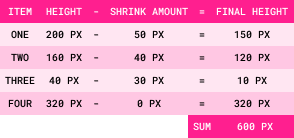
Step 7: Final Size = Item Size - Shrink Amount
Visual Examples


Here is a visual representation of the written example:

The container and items without flex-shrink values:

Item One
original height: 200px
Item Two
original height: 160px
Item Three
original height: 40px
Item Four
original height: 320px

The container and items with flex-shrink values:

Item One
flex-shrink: 1
original height: 200px
final height: 150px
Item Two
flex-shrink: 1
original height: 160px
final height: 120px
Item Three
flex-shrink: 3
original height: 40px final height: 10px
Item Four
flex-shrink: 0
original height: 320px
final height: 320px

The following three examples demonstrate the flex-shrink property with flex items that are all the same size. The following information will be valid for the first 3 examples:

  • The flex container has a static width of 320px.
  • All 3 flex items have a set width of 160px with no padding or margins, which means the minimum amount of space they will take up is 480px (160px x 3 = 480px).
  • This means the items will be wider than the container, making the overflow width 160px (480px - 320px = 160px).

Example 1: The flex-shrink value is 0 for all items.

A
flex-shrink: 0
width: 160px
B
flex-shrink: 0
width: 160px
C
flex-shrink: 0
width: 160px

Since the value is 0 for all items, they will not shrink. This means the items will remain at their minimum width of 160px which will cause them to overflow the container by 160px (160px + 160px + 160px = 480px - 320px = 160px) since wrapping is not set.


Example 2: The flex-shrink value is set to 0 for item A, and 1 (default value) for items B and C.

A
flex-shrink: 0
width: 160px
B
flex-shrink: 1
width: 80px
C
flex-shrink: 1
width: 80px

Since the value is 0 for item A, it will not shrink. Items B and C have a value of 1, so they will shrink to fit the space of the container. In this case, both B and C would shrink by 1/2 of the overflow width, which is 80px (160px / 2 = 80px). This means item B and C will shrink to 80px (160px - 80px = 80px).

Example 3: The flex-shrink value is set to 1 (default value) for item A, 2 for item B, and 3 for item C.

A
flex-shrink: 1
width: 133.33px
B
flex-shrink: 2
width: 106.66px
C
flex-shrink: 3
width: 80px

In this example, all 3 items will shrink to fit the container by different amounts. Item A has a value of 1, item B has a value of 2, and item C has a value of 3. This means item A will shrink by 1/6 of the overflow width, item B will shrink by 2/6 of the overflow width, and item C will shrink by 3/6 of the overflow width. The overflow width needs to be divided by 6 parts in this case (1 + 2 + 3 = 6). This gives us a unit number of 26.66px (160px / 6 = 26.66px). This means item A will shrink to 133.33px (160px - 26.66px = 133.33px), item B will shrink to 106.66px (160px - 53.33px = 106.66px), and item C will shrink to 80px (160px - 80px = 80px).


Flex-Basis

The flex-basis property controls the initial size of the flex item before any growth or shrinkage occurs. The default value is auto which means the initial size of the flex item is determined by the width (if the flex-direction is row based) or height (if the flex-direction is column based) set for the item. The value can be a length, a percentage, or an initial or inherit value. If a length or percentage is set for the flex-basis property, it will override the width or height set for the item UNLESS it is min-width, max-width, min-height, or max-height. When a percentage is used as the value, it is relative to the width of the flex container.

The following information will be valid for this example:

  • The flex container has a static width of 320px.
  • Items A and B have a set width of 160px with no padding or margins.
  • Item C has a set max-width and min-width of 120px with no padding or margins.

Example 1: The flex-basis value is set to 120px for item A, 25% for item B, and 100px for item C.

A
flex-basis: 120px
set width: 160px
width: 120px
B
flex-basis: 25%
set-width: 160px
width: 80px
C
flex-basis: 100px
set max/min-width: 120px
width: 120px

Flex Shorthand

The flex property is a shorthand property for the flex-grow, flex-shrink, and flex-basis properties. It always affects all three properties, and can be specified using one, two, or three values.

Flex: One Syntax Value

When a single value is used for the flex property, it must be one of the following:

  • Number:
    When a number is the only value given, it will read as the flex-grow value. When this is done, the flex-shrink value is automatically set to 1 and the flex-basis value is automatically set to 0. This means that the flex-basis value will be dependent on the size created by the flex-grow value. It also means that flex items will grow or shrink in the container.
  • Width (for rows) or Height (for columns):
    When a width or height is the only value given, it will read as the flex-basis value. When this is done, the flex-grow value is automatically set to 1 and the flex-shrink value is automatically set to 1. This means that flex items will grow or shrink in the container.
  • Keywords:
    There are 3 keywords that can be used for the flex property:
    • auto:
      When auto is the only value given, the items are sized according to their width and height properties, and the flex-grow and flex-shrink values are set to 1. This means that flex items will grow or shrink in the container.
    • none:
      When none is the only value given, the items are sized according to their width and height properties, and the flex-grow and flex-shrink values are set to 0. This means that flex items will not grow or shrink in the container.
    • initial:
      When initial is the only value given, the items are sized according to their width and height properties, the flex-grow property is automatically set to 0, and the flex-shrink property is automatically set to 1. This means that flex items will shrink to fit the container when necessary, but they will not grow to fill the additional space in the container.

Flex: Two Syntax Values

When two values are used for the flex property, the first value must be a number to represent the flex-grow value.

The second value must be one of the following:

  • Number:
    When a number is given as the second value, it will read as the flex-shrink value. The flex-basis value is automatically set to 0% (auto).
  • A Valid Flex-Basis Value: When a flex-basis value is given as the second value, the flex-shrink value is automatically set to its default value of 1.

Flex: Three Syntax Values

When three values are used for the flex property, the first value is the flex-grow value, the second value is the flex-shrink value, and the third value is the flex-basis value.


Align-Self

The align-self property allows the flex item to override the align-items value that is set for the container. It can be used to align the item to the start, end, center, or baseline of the cross axis. Great for when one flex item needs to stand out.

Align-Items Example

A
B
C

The above example has a flex container with the align-items property set to flex-start. The align-self property is set to flex-end for item B, which overrides the align-items: flex-start value in the flex container.

When the flex-direction is related to the row, this will be vertical. When the flex-direction is related to the column, it will be horizontal.


Order

The order property allows the flex item to override the order of the flex items in the container. By default, the order of the flex items is set to 0 which means that the HTML elements are listed in the same order that they are listed in the HTML document. If a reverse direction is set for the flex-direction property, the order of the flex items will be listed in the reverse order that they are listed in the HTML document. To completely customize the order of the flex items, the order property can be used. Useful for when the visual order needs to differ from the source order (ex: responsive layouts where mobile stacking differs from desktop).

Order Example

A
B
C

The above example has a flex container with the order property set to 3 for item A, 1 for item B, and 2 for item C. This means that item A will be the last item in the container, item B will be the first item in the container, and item C will be the second item in the flex container.

Flexbox Summary

Flexbox works by running a layout algorithm on a flex container and its direct children (called flex items). Flexbox is not about setting exact sizes — it's about negotiation between size of items and the space of the container.

The Flexbox Mental Model

Here is the mental model to keep in your head:

  1. The flex container establishes a main axis and a cross axis.
  2. Each flex item starts with a base size.
  3. The browser compares total item sizes to container size.
  4. Extra space is distributed using flex-grow in the flex container.
  5. Overflow is resolved using flex-shrink in the flex container.
  6. Responsiveness is controlled using flex-basis in the flex container.
  7. Final alignment happens with justify-content, align-items, and align-content for the flex container; and align-self in the flex item.
  8. Gap adds consistent spacing between flex items and sometimes the flex container.
  9. Order places flex items in a custom order within the flex container.

Default Flexbox Behavior

Default Flex Container Behavior


Property: Value What This Means
Display: Flex Items line up horizontally.
Flex-Direction: Row All items stay on a horizontal line.
Flex-Wrap: NoWrap Items that overflow the container will not be moved to new rows or columns.
Justify-Content: Flex-Start Items pack toward the start of the main axis.
Align-Items: Stretch Items stretch along the cross axis to match the tallest item.

Default Flex Item Behavior


Property: Value What This Means
Flex-Grow: 0 Items do not grow to fill extra space in the container.
Flex-Shrink: 1 Items are allowed to shrink if space is tight.
Flex-Basis: Auto The item' size starts from its assigned width or height.